
Prompt Optimization
Promptic runs automated experiments to find the best prompt for your LLM task. You provide training examples and evaluation criteria, and Promptic iterates through candidate prompts to maximize your score.
Datasets created as part of an experiment are managed by that experiment. Create an explicit dataset separately when you need a named dataset reused across evaluations or runs.
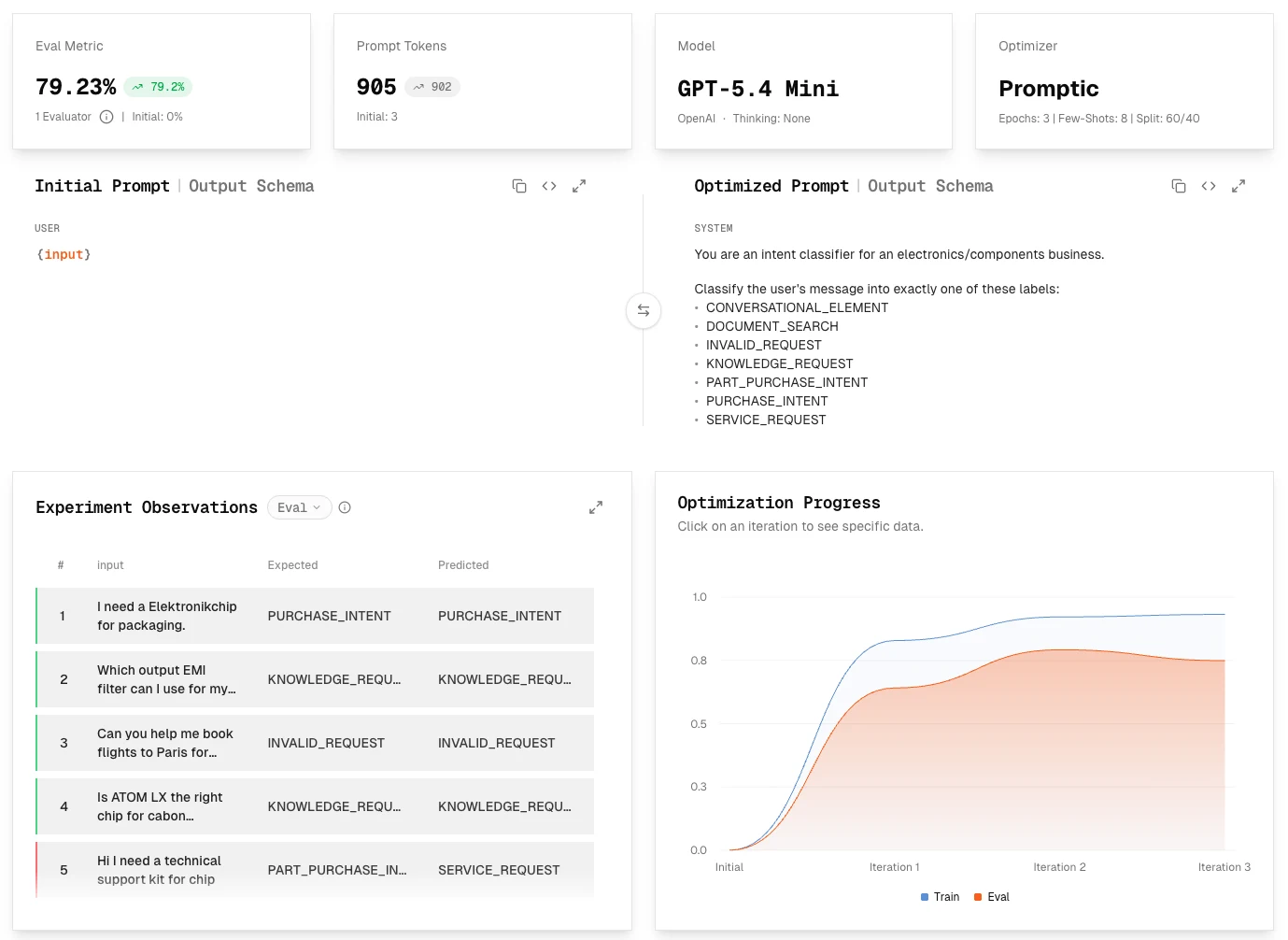
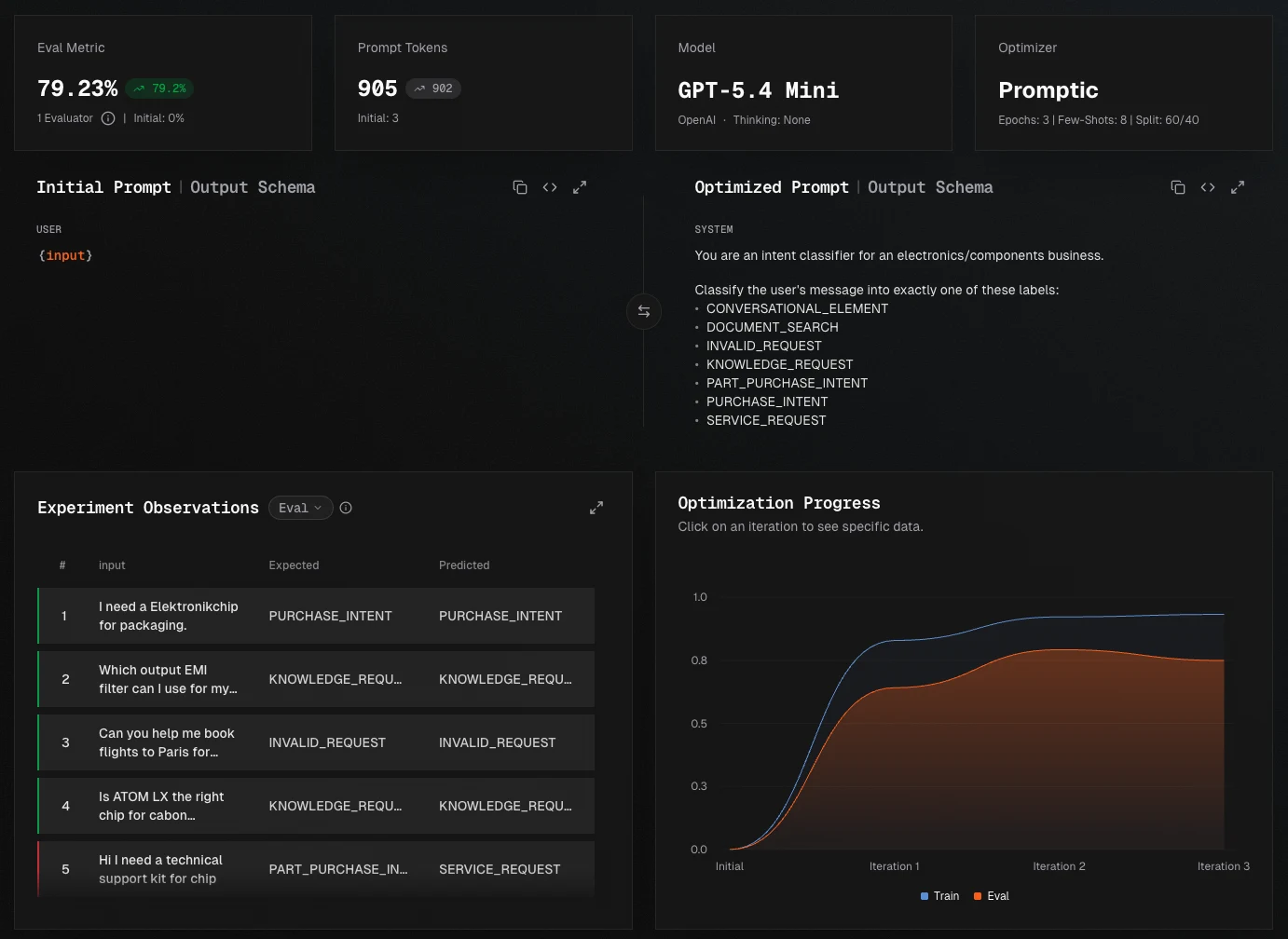
Choose a task type
The task type defines the shape of the expected output and which evaluators can measure it. Choose the type that matches the contract your application needs to uphold—not simply the kind of content in the prompt.
Classification
Classification maps each input to one label from a fixed set, such as spam / not_spam, a
support-intent category, or a sentiment class. Every dataset case should contain the exact expected
label, and the prompt should list or otherwise constrain the allowed labels.
| Evaluation | Use it for |
|---|---|
| F1 | Measuring label accuracy while accounting for precision and recall |
F1 is the evaluator available for classification tasks. Review per-class precision and recall as well as the aggregate score—a high overall score can hide poor performance on a rare but important class. Reserve held-out examples to confirm that improvements generalize beyond the training data.
Text generation
Text generation produces free-form output such as summaries, answers, rewrites, or generated content. Expected outputs are useful references, but multiple answers may be equally valid, so exact matching is rarely appropriate.
| Evaluation | Use it for |
|---|---|
| Similarity | Tasks where semantic closeness to one reference is meaningful |
| Reference judge | Scoring predicted and expected answers against the same rubric |
| Comparison judge | Directly comparing a prediction with the expected answer |
| General judge | Custom rubrics, few-shot evaluation, or additional dataset columns |
Define the qualities that matter—such as factual accuracy, completeness, tone, or concision—and give them separate evaluators when a single score would obscure tradeoffs.
Structured Output / Information Extraction
Structured output is the task type for information extraction: it turns unstructured input into JSON that follows a defined schema. Use it to extract entities and fields from documents, messages, or other content, as well as for form filling, routing payloads, and workflows where downstream code depends on stable field names and types.
| Evaluation | Use it for |
|---|---|
| Structured Output evaluator | Schema validity and configurable field-by-field accuracy |
| Exact field comparison | Enums, identifiers, booleans, integers, and strict text fields |
| Embedding comparison | String fields where paraphrases are acceptable |
| Judge comparison | Fields or arrays requiring domain-specific semantic judgment |
Mark required fields in the schema, choose comparison strategies per field, and weight fields by business importance. Always inspect invalid JSON and missing required fields separately from semantic quality.
How it works
Prompt optimization is an evidence-driven loop with three phases:
| Phase | What happens |
|---|---|
| Define the target | Choose the task type, model, starting prompt, representative dataset cases, and success criteria. |
| Optimize | Promptic generates candidate prompts and scores their outputs with the same evaluators. |
| Validate and ship | Compare held-out results and individual failures, then deploy the best-performing prompt. |
Create an experiment in the dashboard
The following walkthrough turns that lifecycle into a concrete dashboard workflow.
Create the component
Open an AI Application, choose New AI Component, and select Prompt Optimization.
Choose the task type
Select classification, text generation, or structured output based on the required result.
Define the starting prompt
Add an initial prompt or let Promptic establish the baseline.
Add representative dataset cases
Upload, paste, or generate examples, then verify variable mapping and expected outputs.
Configure evaluation
Add at least one evaluator and, when possible, reserve a held-out evaluation split.
Review and start
Review the model, optimization settings, epochs, data, and cost implications. Create the experiment, inspect its summary, then choose Start.
Starting an experiment can trigger model cost. Creation is intentionally separate from Start so you can review data and configuration first.
After it completes, inspect the held-out score, predictions, common failure patterns, latency, and cost—not only the highest aggregate score.
Code example
from promptic_sdk import PrompticClient

with PrompticClient() as client:
    # 1. Create a component
    comp = client.create_component("email-classifier")

    # 2. Create an experiment
    exp = client.create_experiment(
        ai_component_id=comp["id"],
        target_model="gpt-5.6-luna",
        task_type="classification",
        optimizer="prompticV2",
    )

    # 3. Add training data
    client.create_dataset_cases(
        comp["id"],
        exp["datasetId"],
        [
            {
                "inputPayload": {"message": "50% off all items today only!"},
                "expectedPayload": "spam",
            },
            {
                "inputPayload": {"message": "Your order has shipped"},
                "expectedPayload": "not_spam",
            },
            {
                "inputPayload": {"message": "Click here to claim your prize"},
                "expectedPayload": "spam",
            },
            {
                "inputPayload": {"message": "Meeting tomorrow at 3pm"},
                "expectedPayload": "not_spam",
            },
            # Add 20+ cases for best results
        ],
    )

    # 4. Add an evaluator
    client.create_evaluators(exp["id"], [
        {"name": "accuracy", "type": "f1", "weight": 1.0},
    ])

    # 5. Start the experiment
    client.start_experiment(exp["id"])
Monitor progress in the dashboard or poll the API:
    # Check the best iteration so far
    best = client.get_best_iteration(exp["id"])
    print(f"Score: {best['overallNormalizedScore']}")
    # When `trainSplitRatio` is set, `evalNormalizedScore` reports the
    # held-out eval performance. See "Train / eval split" below.
    print(f"Eval score: {best['evalNormalizedScore']}")
    print(f"Prompt: {best['prompt']}")
Evaluator types
| Type | Description | Best for |
|---|---|---|
f1 | F1 score against expected labels | Classification tasks |
referenceJudge | LLM scores predicted and expected independently, rewards matching | Intrinsic quality rubrics (e.g. "is this well-reasoned") |
comparisonJudge | LLM sees predicted and expected together, rates how they compare | Rubrics that relate the two outputs (structural match) |
generalJudge | User-defined multi-message prompt with template variables | Multi-turn judges, few-shot judges, dataset-column refs |
similarity | Text similarity to expected output | Paraphrasing, translation |
structuredOutput | Schema validation + field accuracy | Structured output tasks |
You can use multiple evaluators with different weights:
client.create_evaluators(exp["id"], [
    {"name": "accuracy", "type": "f1", "weight": 0.7},
    {
        "name": "quality",
        "type": "referenceJudge",
        "weight": 0.3,
        "scaleMin": 1,
        "scaleMax": 5,
        "config": {
            "instructions": (
                "Score the answer's factual accuracy. "
                "5 = fully accurate and well-supported; "
                "1 = incorrect or unsupported."
            ),
        },
    },
])
Judge evaluator configs
All three judge types accept a scaleMin/scaleMax range and require a
config.
referenceJudge/comparisonJudge—config.instructions(string): the rubric text. The reference judge scores each side of the pair independently against the rubric (caching the expected-side judgment) and rewards predictions that match or exceed the expected score. The comparison judge scores the predicted output directly against the expected in one prompt.generalJudge—config.messages(list of{role, content}): the full judge prompt.roleissystem,user, orassistant.contentcan reference{input},{expected},{predicted}, or any dataset column name (e.g.{difficulty}). Unknown{tokens}are left as-is so misreferenced variables are visible in the rendered prompt.
# Comparison judge: structural match between predicted and expected
client.create_evaluators(exp["id"], [
    {
        "name": "structure",
        "type": "comparisonJudge",
        "weight": 1.0,
        "scaleMin": 1,
        "scaleMax": 3,
        "config": {
            "instructions": (
                "3 = counts and contents match per table. "
                "2 = counts match but some content differs. "
                "1 = counts differ."
            ),
        },
    },
])

# General judge: custom multi-message prompt referencing dataset columns
client.create_evaluators(exp["id"], [
    {
        "name": "custom_judge",
        "type": "generalJudge",
        "weight": 1.0,
        "scaleMin": 1,
        "scaleMax": 5,
        "config": {
            "messages": [
                {
                    "role": "system",
                    "content": (
                        "You are a strict evaluator. Reply with short "
                        "reasoning followed by an integer score."
                    ),
                },
                {
                    "role": "user",
                    "content": (
                        "Difficulty: {difficulty}\n"
                        "Input:\n{input}\n\n"
                        "Expected:\n{expected}\n\n"
                        "Predicted:\n{predicted}"
                    ),
                },
            ],
        },
    },
])
structuredOutput evaluator config
The structuredOutput evaluator scores a JSON-shaped prediction against an
expected reference. By default, scoring is derived from the
schema_definition:
- string fields → embedding similarity (semantic match via OpenAI text embeddings).
- enum / boolean / integer fields → exact equality.
- number fields → tolerance-based equality.
- nested object fields → recursive aggregation.
- array fields → content-aligned soft F1 (greedy alignment on a similarity matrix; not positional).
Override the per-field defaults via fields and add domain-specific
LLM-as-judge guidance via judge_instructions.
Per-field overrides (fields)
fields is keyed by the dotted JSON path of each field. Each entry can set:
| Key | Type | Description |
|---|---|---|
include | bool | Skip the field entirely when false. Default true. |
weight | float | Positive weight applied to this field's score. Default 1.0. |
method | string | One schema-aware scoring method from the tables below. |
judge_instructions | string | Optional guidance only for judge or array_judge. |
Whether a field counts as required is read from the JSON schema's required array — there is no per-field required override here, so that decision lives in one place.
Scalar methods:
| Value | Behavior |
|---|---|
exact | Character-for-character equality (with float tolerance for numbers). |
embedding | Cosine similarity via OpenAI text-embedding-3-small, with a calibrated floor (see Cosine similarity floor below). |
contains | Case-insensitive substring match — expected must appear in predicted. |
judge | LLM-as-judge per-pair scoring on supported scalar fields, including text, numbers, booleans, and enums. Adds reasoning to the case-details sheet. Requires the experiment's judge LLM. |
Array methods:
| Value | Behavior |
|---|---|
array_exact | Multiset-intersection F1 under exact equality. Suitable for arrays of enums / IDs. |
array_similarity | Greedy alignment on the similarity matrix, soft F1. Default for string and object arrays. |
array_judge | Whole-array single-call LLM judgment that returns F1-compatible counts. Suitable for arrays of strings/objects where paraphrase or semantic equivalence matters across items. |
For a mixed union such as string | number | boolean | array | null, use
method: "judge". It compares the complete field value semantically, including
when the expected and predicted values use different variants. Use
judge_instructions to define equivalence for ranges, tolerances, or formatting.
Fields whose non-null type is always an array use array_judge instead.
To exclude a union field, set include: false; no method is required.
An excluded field may retain its existing method or an SDK default. Method
compatibility is checked again when the field is included in scoring.
Judge instructions
Set judge_instructions on an individual judged field to add domain-specific
guidance. The
built-in rubric — "do these convey the same essential information?" —
always applies; optional guidance is configured on each judged field.
client.create_evaluators(exp["id"], [
    {
        "name": "extracted-fields",
        "type": "structuredOutput",
        "weight": 1.0,
        "config": {
            "schema_definition": {
                "type": "object",
                "properties": {
                    "company": {"type": "string"},
                    "tags": {"type": "array", "items": {"type": "string"}},
                    "summary": {"type": "string"},
                },
            },
            "fields": {
                # Paraphrase OK — score by semantic equivalence per pair.
                "summary": {"method": "judge"},
                # Match items by semantics, not embedding distance.
                "tags": {"method": "array_judge", "judge_instructions": "Ignore casing and punctuation."},
                # Tighten the default to require an exact company match.
                "company": {"method": "exact"},
            },
        },
    },
])
When an array_judge-configured array exceeds 50 items on either side, the
evaluator falls back to similarity aggregation and surfaces a warning
badge on the case-details sheet so you can spot the bypass.
Cosine similarity floor
The embedding strategy maps cosine similarity to [0, 1] with a
calibrated floor (0.15, tuned for text-embedding-3-small): unrelated
string pairs are clipped to 0.0 instead of the previous ~0.55 from a
naive (cos + 1) / 2 remap, and pairs above the floor are linearly
rescaled so an exact match still lands at 1.0. Re-running an older
experiment with string-heavy schemas will show lower scores on
unrelated-string cases and a sharper gradient on near-matches.
When fine-grained semantic scoring matters more than embedding distance
(e.g. paraphrase detection with tight tolerances), configure those fields
with "method": "judge" instead.
Optimizers
| Optimizer | Description |
|---|---|
prompticV2 | Promptic's default optimizer. Recommended for most tasks. |
miproV2 | DSPy MIPROv2 optimizer. Good for few-shot learning. |
bootstrapFewShot | DSPy bootstrap few-shot optimizer. |
gepa | Genetic/evolutionary prompt optimization. |
Hyperparameters
Customize the optimization process:
exp = client.create_experiment(
    ai_component_id=comp["id"],
    target_model="gpt-5.6-luna",
    task_type="classification",
    optimizer="prompticV2",
    hyperparameters={
        "epochs": 5,              # Number of optimization rounds
        "trainSplitRatio": 0.8,   # Train/eval split (see below)
        "numFewShots": 3,         # Few-shot examples in prompt
        "enableCot": True,        # Chain-of-thought reasoning
    },
)
Train / eval split
Reserve part of your dataset to verify that an improved prompt also performs well on cases it did
not use during optimization. Set trainSplitRatio between 0.1 and 0.95 to choose what
proportion of dataset cases Promptic uses for optimization and what proportion it keeps for this
independent check.
Promptic evaluates every candidate against the reserved cases. This reduces the risk of choosing a prompt that performs well only on a small training set and gives you stronger evidence that the result will generalize to production data.
Each iteration then reports two scores:
| Field | Meaning |
|---|---|
overallNormalizedScore | Score on the train split (used to guide the search). |
evalNormalizedScore | Score on the held-out eval split. null if no split configured. |
get_best_iteration ranks iterations by evalNormalizedScore when a split is
configured, falling back to overallNormalizedScore otherwise.
best = client.get_best_iteration(exp["id"])
print(f"Train score: {best['overallNormalizedScore']}")
print(f"Eval score:  {best['evalNormalizedScore']}")  # None if no split
Omit trainSplitRatio (or set it to null) to train and score on the full
dataset.
Per-iteration latency
Every iteration also reports avgPredictionLatencyMs — the mean wall-clock
duration (in milliseconds) of the target-model prediction calls in that
iteration, averaged across train and eval predictions. Retries, rate-limit
backoff, and failed attempts are excluded so the value reflects real per-call
response time. This lets you compare two equally-scoring iterations on speed
and trade a small accuracy delta for a faster prompt when latency matters.
| Field | Meaning |
|---|---|
avgPredictionLatencyMs | Mean target-model latency per prediction, in milliseconds. Absent (or null) on older runs that pre-date latency tracking. |
The key may be absent on older iterations rather than present-but-null, so
prefer .get("avgPredictionLatencyMs") over direct subscript:
best = client.get_best_iteration(exp["id"])
print(f"Score: {best['overallNormalizedScore']}")
print(f"Avg latency: {best.get('avgPredictionLatencyMs')} ms")
Classification metrics in the dashboard
For classification experiments, the experiment detail page includes a
Metrics tab that breaks the aggregate F1 score down by label for the
selected iteration:
- Accuracy and prediction coverage — share of rows where the predicted label matched the expected one, and share of rows where the model returned any usable label at all.
- Macro precision, recall, F1, and weighted F1 — macro variants treat every label equally; weighted F1 weights each label by support. Complements the single aggregate score with per-label detail.
- Confusion matrix — actual labels as rows, predicted labels as columns. Highlights which label pairs the model confuses most.
- Per-class table — precision, recall, F1, support, true positives, false positives, and false negatives for each label. Labels the model over-predicts, misses, or mislabels are surfaced as watch items.
- Most common mistakes — the top actual-to-predicted mismatches, sorted by frequency.
Missing or failed predictions surface as their own bucket so they show up as coverage loss and recall loss instead of being silently dropped. When a train/eval split is configured, a split selector switches the view between train and eval predictions; scores are also compared against the initial iteration so you can see how each metric moved.
Providing an initial prompt
If you already have a prompt, provide it as a starting point:
exp = client.create_experiment(
    ai_component_id=comp["id"],
    target_model="gpt-5.6-luna",
    task_type="classification",
    initial_prompt="Classify the following email as spam or not_spam.",
)
The optimizer uses this as a baseline and tries to improve upon it.
Continuing from a previous experiment
Once an experiment has finished, you can clone it to keep iterating without rebuilding the dataset:
In the dashboard, open the completed experiment and use the actions in the top-right corner. Duplicate (overlapping squares) creates a new experiment from the original prompt, dataset cases, and evaluators. Continue (branching arrow) uses the best optimized prompt as the starting point for another optimization run.

# Duplicate: same dataset cases + evaluators, starts from the source's initial prompt.
clone = client.duplicate_experiment(exp["id"])

# Continue: same dataset cases + evaluators, starts from the source's best
# optimized iteration. Useful for chaining optimization runs.
next_run = client.duplicate_experiment(exp["id"], continue_from_optimized=True)

client.start_experiment(next_run["id"])
The CLI exposes the same flow via promptic experiments duplicate <id> and
promptic experiments continue <id> (add --start to launch immediately).
Next steps
Once your experiment completes, deploy the optimized prompt to use it in production.