
Tracing
Promptic uses OpenTelemetry to automatically capture every LLM call your application makes. Once set up, you get full visibility into requests, responses, token usage, cost, and latency — with zero manual instrumentation.
Setup
import promptic_sdk

promptic_sdk.init(service_name="support-api")
init() installs OpenTelemetry instrumentation for all detected LLM libraries and exports spans to the Promptic platform.
The API key assigns every trace to its AI Application. service_name identifies the emitting
workload within that application; it is discovered from telemetry and does not need to be created
in the dashboard.
Supported providers and frameworks
Install the SDK with the extras for your stack:
| Category | Item | Install command |
|---|---|---|
| LLM provider | OpenAI | pip install promptic-sdk[openai] |
| LLM provider | Anthropic | pip install promptic-sdk[anthropic] |
| LLM provider | AWS Bedrock | pip install promptic-sdk[bedrock] |
| LLM provider | Google Vertex AI | pip install promptic-sdk[vertexai] |
| LLM provider | Mistral | pip install promptic-sdk[mistralai] |
| Agent framework | LangChain / LangGraph / create_agent / deepagents | pip install promptic-sdk[langchain] |
| Agent framework | OpenAI Agents SDK | pip install promptic-sdk[openai-agents] |
| Agent framework | Claude Agent SDK | pip install promptic-sdk[claude-agent] |
| Google Generative AI and Cohere | (included by default) | pip install promptic-sdk |
| Everything | All of the above | pip install promptic-sdk[all] |
Pydantic AI is also supported without any extra: it ships its own
OpenTelemetry emitter. Enable it with Agent(..., instrument=True) and its
spans will flow to Promptic through the same TracerProvider that init()
configures.
Configuration
promptic_sdk.init(
    api_key="ptc_...",          # default: PROMPTIC_API_KEY env var
    endpoint="https://...",      # default: https://promptic.eu
    auto_instrument=True,        # default: True — auto-detect and instrument LLM libs
    service_name="my-service",   # optional — sets the OTel service name
)
Set the standard OpenTelemetry deployment environment alongside the API key:
export OTEL_RESOURCE_ATTRIBUTES="deployment.environment.name=production"The Tracing explorer can filter the same canonical traces by AI Application, service, and environment. Development and production traces use the same model; the environment distinguishes them operationally.
AI Components
AI Components are optional attribution for LLM-powered capabilities. Attribution is recorded on spans, so one trace may cross multiple components, agents, tools, or services:
with promptic_sdk.ai_component("email-classifier"):
    # All LLM calls inside this block are tagged with "email-classifier"
    response = client.chat.completions.create(...)

with promptic_sdk.ai_component("support-agent"):
    # These traces are tagged with "support-agent"
    response = client.chat.completions.create(...)
Create components explicitly through the dashboard, SDK client, or API. An unknown component name does not create a component during trace ingestion.
Evaluate a trace
Open a trace in the dashboard and select Evaluate trace to assess that individual execution. The evaluation panel offers four predefined evaluators:
| Evaluator | Assesses |
|---|---|
| Execution Efficiency | Useful work, repeated actions, and completion timing |
| Tool Selection Accuracy | Whether tool calls covered the expected work and succeeded |
| Plan Adherence | Whether the execution followed its plan without unnecessary work |
| Reasoning Coherence | Whether available reasoning is consistent and well-supported |
Execution Efficiency and Tool Selection Accuracy are selected by default. You can choose a different combination before starting the evaluation. Results are stored per evaluator, and cited evidence links back to the relevant span in the trace.
The trace must belong to the active AI Application. AI Component attribution is optional context; it is not required to evaluate the trace. Evaluations consume Promptic Credits, and LLM-backed evaluators can also incur model-provider usage.
Tracing workflows with custom spans
Most users don't need this. With the right [extras] installed, auto-instrumentation already
creates spans for every LLM and tool call. Reach for custom spans only when you have meaningful
non-LLM workflow logic (retrieval, normalization, business rules, control flow) you want
represented in the trace.
When you do need it, wrap your workflow stages in custom OpenTelemetry spans. Auto-instrumented LLM and tool spans automatically nest under whichever custom span is active.
The recommended pattern:
- Wrap the whole run in one root workflow span inside
ai_component(...). - Add a child task span for each meaningful stage of the pipeline.
- Record each stage's input and output as span attributes so the trace reads as a transformation, not just a list of LLM calls.
import json
import promptic_sdk
from opentelemetry import trace

promptic_sdk.init()
tracer = trace.get_tracer(__name__)

with promptic_sdk.ai_component("support-agent"):
    with tracer.start_as_current_span("answer_question") as root:
        root.set_attribute("traceloop.span.kind", "workflow")
        root.set_attribute("traceloop.entity.input", json.dumps(user_input))

        with tracer.start_as_current_span("retrieve_context") as span:
            span.set_attribute("traceloop.span.kind", "task")
            span.set_attribute("traceloop.entity.input", json.dumps(query))
            context = retrieve(query)
            span.set_attribute("traceloop.entity.output", json.dumps(context))

        with tracer.start_as_current_span("generate_answer") as span:
            span.set_attribute("traceloop.span.kind", "task")
            # The auto-instrumented LLM call nests under this task span
            answer = llm_call(context)

        root.set_attribute("traceloop.entity.output", json.dumps(answer))
Span attribute conventions:
| Attribute | Use |
|---|---|
traceloop.span.kind="workflow" | The top-level run |
traceloop.span.kind="task" | An internal pipeline stage |
traceloop.entity.input / traceloop.entity.output | JSON-serialized stage payloads, surfaced in the Promptic UI |
File and media artifacts
Promptic automatically keeps large inline file content out of trace rows. If an
auto-instrumented provider emits base64 media in span attributes, the SDK and
ingestion layer upload the bytes as trace artifacts and replace the original
payload with a lightweight promptic-artifact://... reference. The trace UI
uses that reference to render images and files on demand, while the trace API
stays small and reliable.
This covers common multimodal payloads such as OpenAI data-URI images,
Anthropic base64 media sources, Gemini inline data, Bedrock byte fields, and
large text/markdown/json fields. Existing external https://... media URLs are
left as URLs and rendered directly.
Local filesystem paths are intentionally not read automatically. A span
attribute like /tmp/report.pdf is only a string, and silently uploading it
could leak files the application did not intend to trace. Attach local files
explicitly when you want their contents available from the trace:
import promptic_sdk

file_ref = promptic_sdk.artifact("/tmp/report.pdf")
span.set_attribute("retrieval.input_file", file_ref.uri)
Fetch artifacts through the SDK or CLI:
from promptic_sdk import PrompticClient

with PrompticClient() as client:
    artifacts = client.list_trace_artifacts(trace_id)
client.download_artifact(artifacts["data"][0]["id"], "artifact.bin")promptic traces artifacts <trace-id>
promptic artifacts get <artifact-id> --output artifact.binSDKs can also avoid routing artifact bytes through Promptic by uploading to a
private storage_object first and then registering the artifact metadata. The
trace still stores only the promptic-artifact://... reference.
Direct artifact uploads are always scoped to the authenticated AI application in object storage. When the artifact is registered, Promptic verifies that the storage object belongs to the same AI application, is private, exists in the trace-artifacts prefix, and has the expected size and content type without downloading the file body.
A few tips:
-
Use semantic span names (
retrieve_context,rerank_results) rather than generic function names, so repeated stages stay distinguishable in the trace view. -
For huge collections, still prefer logging a small preview plus a count. Artifacts are for file-like content, not for turning every trace into a data dump:
span.set_attribute(
    "traceloop.entity.output",
    json.dumps({
        "items": items[:5],
        "item_count": len(items),
        "additional_item_count": max(len(items) - 5, 0),
    }),
)
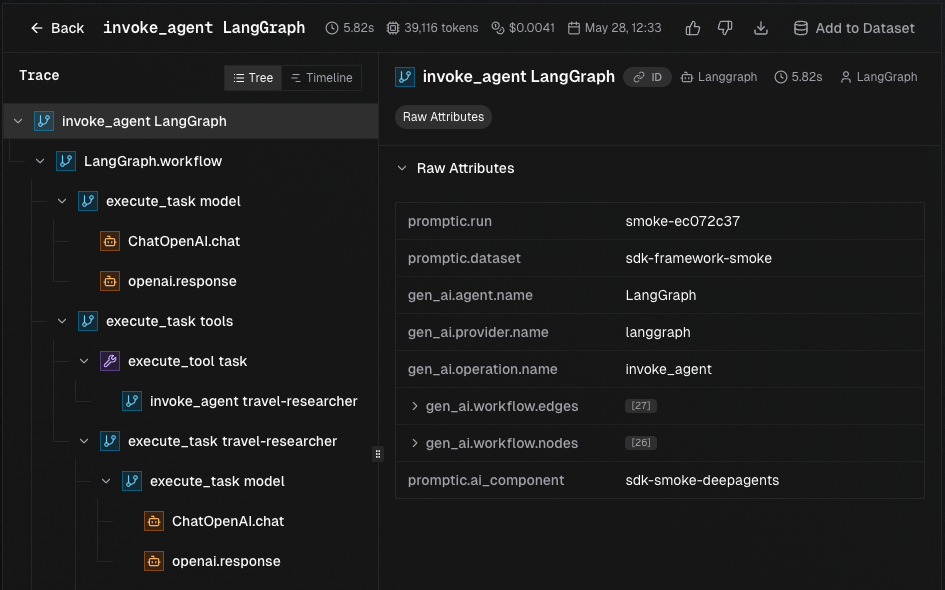
The result is a single trace where the root workflow span carries the structured input and output, task spans appear as its children, and every auto-instrumented LLM or tool call nests under the stage that triggered it.
LangGraph and deepagents support
pip install promptic-sdk[langchain] installs OpenLLMetry's
opentelemetry-instrumentation-langchain (≥0.60), which covers LangChain
chains, LangGraph (create_agent), and deepagents with subagents. It emits
the official OpenTelemetry GenAI semantic conventions
(gen_ai.operation.name, gen_ai.tool.definitions, gen_ai.tool.name,
gen_ai.usage.*) — the same schema Promptic's trace parser uses for every
framework, producing consistent trace trees for flat agents and multi-agent graphs.
No extra configuration required.
Alternative: LangSmith OTel bridge
If you prefer LangSmith's built-in OTel exporter (for hybrid setups where
traces also flow to LangSmith), set these env vars before calling init():
LANGSMITH_TRACING=true
LANGSMITH_OTEL_ENABLED=true
The SDK will propagate the promptic.ai_component tag through LangSmith's
run metadata so bridged spans are still linked to the right component. Note that the
LangSmith bridge does not emit tool definitions, so the "unused tools"
evaluator insight will not fire on LangSmith-bridged traces.
Custom OpenTelemetry instrumentors
Since Promptic uses standard OpenTelemetry, you can add any OTel instrumentor alongside the built-in ones:
import promptic_sdk
from opentelemetry.instrumentation.httpx import HTTPXInstrumentor

promptic_sdk.init()
HTTPXInstrumentor().instrument()  # Also trace HTTP calls
What's captured
Each trace includes:
| Field | Description |
|---|---|
| Model | The model used (e.g., gpt-4o, claude-sonnet-4-20250514) |
| Provider | OpenAI, Anthropic, Google, etc. |
| Input/Output | Full request and response content |
| Tokens | Input, output, and total token counts |
| Cost | Estimated cost in USD |
| Latency | Duration in milliseconds |
| Status | ok or error |
| Spans | Individual API calls within the trace |
Captured content can contain customer data. Review Security and data handling before enabling tracing for production workloads.