
Agent Optimization
An agent is an AI system that works toward a goal by combining a model with instructions, tools, data, and application logic. Unlike a single model call, an agent may make several decisions, call tools, inspect intermediate results, retry work, and produce structured output or files.
That flexibility also creates more ways to fail. A convincing demo does not show whether the agent works reliably across common requests, difficult edge cases, or changes to its model, tools, and workflow. Benchmarking replaces one-off testing with a repeatable contract: every variant receives the same cases and is judged by the same evaluation plan.
Agent Optimization gives you that benchmark, an evaluation engine, and a leaderboard for comparing complete agent variants. Run each variant in your own environment and submit its outputs, artifacts, and traces. The evaluation engine applies the configured deterministic checks and AI judges to every case, then the leaderboard brings those results together so you can find regressions and decide which implementation to ship. It is the right workflow when success depends on tool use, multi-step decisions, generated files, or other behavior that cannot be evaluated by optimizing a prompt alone.
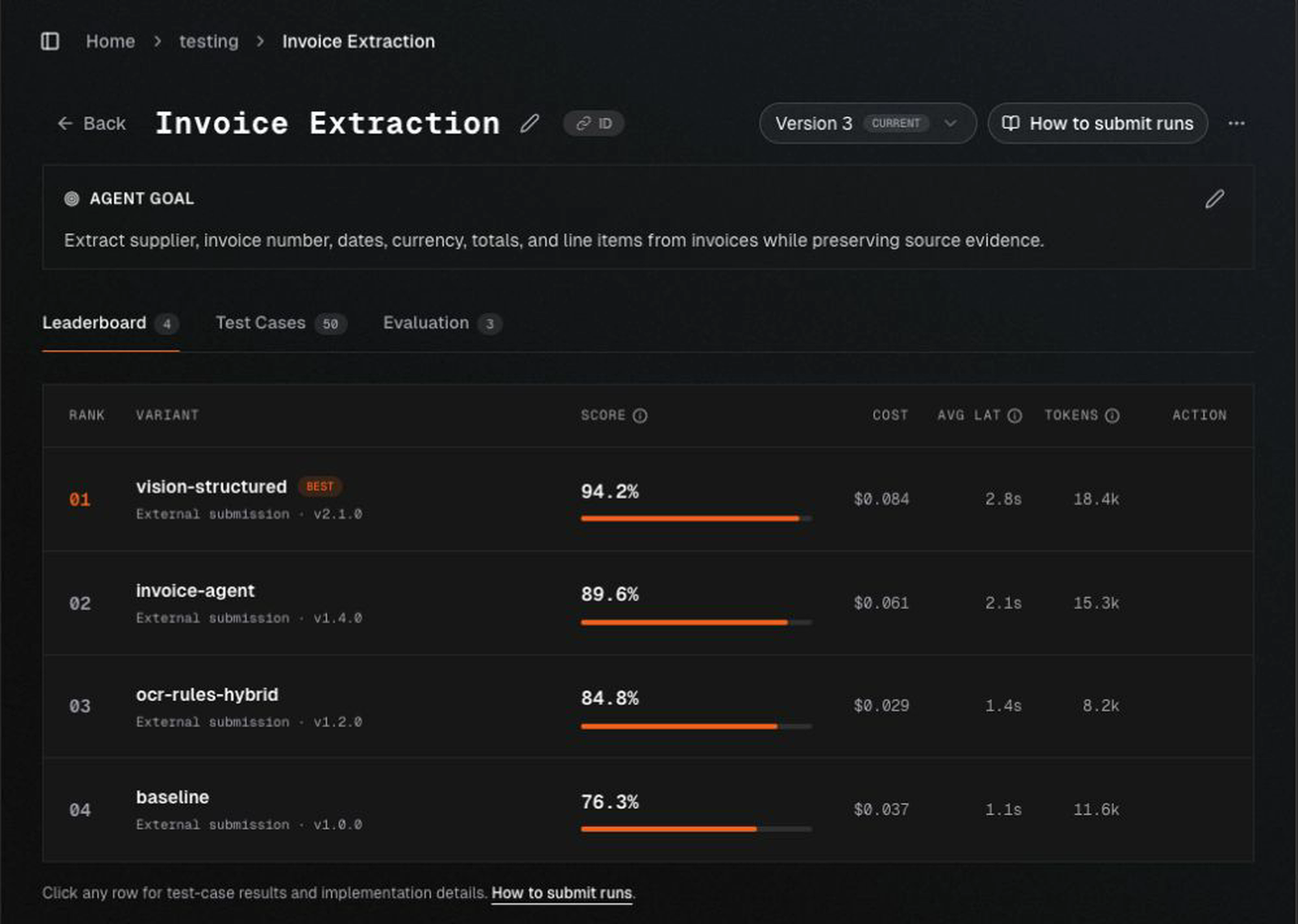
What you compare
A benchmark is the shared test contract used to measure every variant. It combines the Agent's goal, input and output schemas, test cases, and evaluation plan. Keeping that contract fixed is what makes scores from different variants comparable.
A variant is one identifiable agent implementation. Give each variant a stable name and version so the leaderboard can distinguish a baseline from later changes.
| Concept | What it represents |
|---|---|
| Agent | The AI Component that owns the benchmark, variants, and results |
| Benchmark | The goal, schemas, cases, evidence, and evaluators used to test variants |
| Version | An immutable snapshot of that benchmark |
| Variant | A named and versioned agent implementation |
| Run | One variant executed against every case in one benchmark version |
| Prediction | One case result, including output, artifacts, trace, and diagnostics |
| Evaluation | The scores and judgements produced from the submitted evidence |
Record the repository URL, commit hash, architecture description, and reason for a change when available. This makes a winning result reproducible instead of leaving only a display name and score.
Configure an Agent
Describe the goal
State what the agent must accomplish and what a successful result looks like. Keep implementation instructions out of the goal when different variants are allowed to solve the task differently.
Define the Agent contract
The Input and Expected Output schemas form the Agent's data contract: what every run receives and what a successful run can return. Define the expected output when success can be represented as structured fields or output files. Leave it empty when success should be judged only from expected behavior or the execution trajectory.
Schema fields can be nested and can include files. A file field binds uploaded evidence to a specific input or output field so runners and evaluators can treat it consistently.
Add representative cases
Cases turn the Agent's broad goal into concrete, repeatable examples. They determine what the benchmark actually measures, so they should reflect the requests, inputs, and failure modes the Agent will encounter in practice. A varied case set also prevents a variant from looking strong only because it handles a few ideal examples.
Create cases manually or import a JSON manifest or ZIP package. A case can contain:
- structured inputs and input files;
- expected output values and output files; and
- expected behavior written for that individual case.
Expected behavior is useful when several outputs may be valid but the agent still needs to follow case-specific requirements. Include normal cases, edge cases, and failures that matter to the business—not only demonstrations the current agent already handles.
Configure evaluation
Do not choose a winning variant by gut feeling. Add evaluators that translate the Agent's success criteria into consistent scores for every case. Different evaluator types can check structured answers, generated files, overall task completion, or execution behavior. See Choose evaluators below.
Publish the version
When the setup is ready, publish it as Version 1. Publishing freezes the goal, Agent contract, cases, and evaluation plan used for new runs. Later edits stay in a draft until you publish a new version, so existing leaderboard results retain the benchmark under which they were produced.
Choose evaluators
Add one or more evaluators based on what “good” means for the Agent. Start with the most direct measure of success, then combine evaluators when one score cannot cover the complete task. For example, one evaluator can check structured values while another reviews a generated report or the steps the Agent took.
| Evaluator | What it measures and when to use it |
|---|---|
| Classification F1 | Measures classification quality across labelled enum fields by balancing precision and recall. Use it for categories such as intent, document type, or routing outcome, especially when classes are imbalanced. |
| Field-level judge | Scores individual structured output fields with the comparison appropriate to each field, such as exact, numeric, list, or semantic matching. Use it when an output contract contains several fields with different correctness rules. |
| Verifier agent | The most comprehensive and flexible evaluator. It can inspect all enabled evidence—including case inputs, expected output or behavior, submitted output, generated files, and execution traces—and investigate the result against your criteria. Use it for holistic task completion, complex reports, artifacts, and workflows that require judgement across several forms of evidence. |
| Expected Behavior Judge | Reviews the execution trace against the case's Expected Behavior to assess tool selection, action order, intermediate decisions, and workflow behavior. Use it when the path taken matters in addition to the final result. |
Choose in this order:
- Use Classification F1 when the answer is a categorical label and quality must be measured across the complete case set.
- Use a Field-level judge when a structured Output contract lets you state how each field should be compared.
- Add the Expected Behavior Judge for a specific trace requirement that cannot be inferred from the final output.
- Use a Verifier agent when scoring requires an investigation across several pieces of evidence, generated files, or execution details.
Do not default to an Agent verifier merely because it is more capable. Deterministic and field-level evaluation is faster, cheaper, and easier to calibrate. The Verifier agent is appropriate when the criterion genuinely requires judgement or evidence gathering.
Classification F1 and field-level judges use an evaluator weight. A verifier instead returns one to eight named metrics, each of which is scored and aggregated independently. Configure weight and an optional passing threshold per verifier metric. This keeps a broad verifier from hiding which criterion improved or failed.
For a verifier agent, select only the evidence relevant to its criteria: case inputs, expected
output or behavior, submitted output (including generated files), and, when useful, the execution
trace. Give each metric specific instructions and use the default investigation budget of 20 steps
unless the task needs a different limit. Shell and image inspection are platform-provided verifier
capabilities, not evaluator settings. The Expected Behavior Judge uses its fixed evidence and
behavior_compliance metric; you may choose its model and tune that metric's aggregation settings.
When execution-trace evidence is enabled, the Verifier agent and Expected Behavior Judge can inspect linked spans, tool calls, statuses, timing, and stored inputs and outputs. Every retained span is available in an individually inspectable file, with an index that preserves the span tree. A compact navigation file lists every span with its ID, parent ID, name, status, and file reference. The judge can search or read the index in chunks and inspect full payloads in individual span files. Metrics can cite individual span files. Raw span files preserve the full retained metadata, arguments, inputs, and outputs; individual tool responses are bounded, but the navigation files include every retained span. Dedicated trace-level user and session identifiers are excluded from judge evidence. This does not redact identifying information embedded in inputs, outputs, or metadata. Registered artifacts attached to selected traces are also made available locally, including images. The trace indexes link each artifact to its span and citable file. Files that are missing, inaccessible, or exceed the 10 MiB file limit are reported as unavailable. Trace artifacts are streamed to disk and shared across repeated references; the limit is per file. Trace artifacts and their extracted text also share a 256 MiB budget per evaluation by default. Repeated references to the same file count once. Files or extracted text that exceed the remaining budget are explicitly reported as unavailable, while all span and artifact references remain indexed. Oversized trace artifacts are not downloaded in full for previews. URLs appearing only in span text are not automatically downloaded. Missing or inaccessible traces are reported as unavailable evidence. Only retained trace data is included; enabling trace access does not restore deleted data. Trace inspection does not give the verifier network access.
Read Evaluators and judges for evaluator-specific guidance.
Submit a variant
Agent Optimization does not require Promptic to host the candidate runtime. The Python SDK can:
- open a submission session for the active benchmark version;
- materialize each case and its input files locally;
- call your trusted Python function once per case;
- upload each completed prediction and generated artifact;
- submit the complete run for scoring; and
- wait for the evaluated result.
For untrusted or isolated runtimes, keep Promptic credentials in a trusted runner and use the lower-level session API to transfer only the resulting predictions, artifacts, and trace links.
See External Agent Submissions for the complete SDK, CLI, and REST workflow.
Read progress and results
While a variant is running, the variant view and leaderboard show submitted coverage such as
125 / 500 submitted. This reflects durable predictions already received by Promptic; it is not
an estimate of the candidate process's local progress.
After scoring, review more than the combined score:
- success rate and evaluator-level scores;
- failed, skipped, and cancelled cases;
- latency and token usage;
- judge rationales and evaluator failures;
- score coverage, especially failed, skipped, or insufficient-evidence evaluations;
- generated artifacts and linked traces; and
- individual regressions compared with the baseline variant.
Only runs evaluated against compatible benchmark versions belong in a direct comparison. If only the evaluators change, re-evaluate existing predictions under the new published evaluation plan. If the goal, schemas, cases, or execution evidence requirements change, submit each relevant variant again against the new version.
Edit without changing active runs
After Version 1 is active, edits are saved in a draft. The current active version continues to serve submissions and results until the draft is published.
Schema changes can make existing cases invalid. Resolve every affected case before publishing. You can abandon the draft without changing the active version, and historical versions remain read-only so their runs keep their original meaning.
This creates a safe iteration loop:
- create a draft;
- update the goal, schema, cases, or evaluators;
- resolve validation issues;
- publish the next immutable version; and
- re-evaluate existing runs when only evaluation changed, or resubmit variants when execution inputs changed.