
Evaluators and judges
An evaluator turns behavior into a signal you can compare. Choose the simplest evaluator that measures the real requirement; adding an LLM judge does not compensate for an ambiguous rubric.
Prompt-optimization evaluators
| Evaluator | Best for | Notes |
|---|---|---|
f1 | Classification | Measures label correctness across classes |
similarity | Free-form text | Semantic similarity to a reference answer |
referenceJudge | Independent output quality | Judges predicted and reference outputs separately |
comparisonJudge | Pairwise structural or quality comparison | Gives the judge both predicted and expected output |
generalJudge | Custom rubric | Uses your messages and dataset variables |
structuredOutput | JSON/schema tasks | Per-field strategies, weights, required fields, and diagnostics |
toolSelection | Tool routing | Attached automatically to tool-optimization experiments |
The Prompt Optimization guide documents configuration fields and examples for each type.
Agent Optimization evaluators
Agent benchmarks can combine deterministic structured checks with evidence-aware judges:
Benchmark judges accept only the OpenAI models marked judgeEligible in the AI Application's
available-model list. Other models may be available for different work but cannot be selected for
these evaluators. If you do not choose a judge model, the evaluator uses its default.
| Evaluator | Best for | Configuration |
|---|---|---|
| Classification F1 | Enum labels such as intent, document type, or routing outcome | Select one or more enum output fields. An evaluator weight controls its contribution to the combined score. |
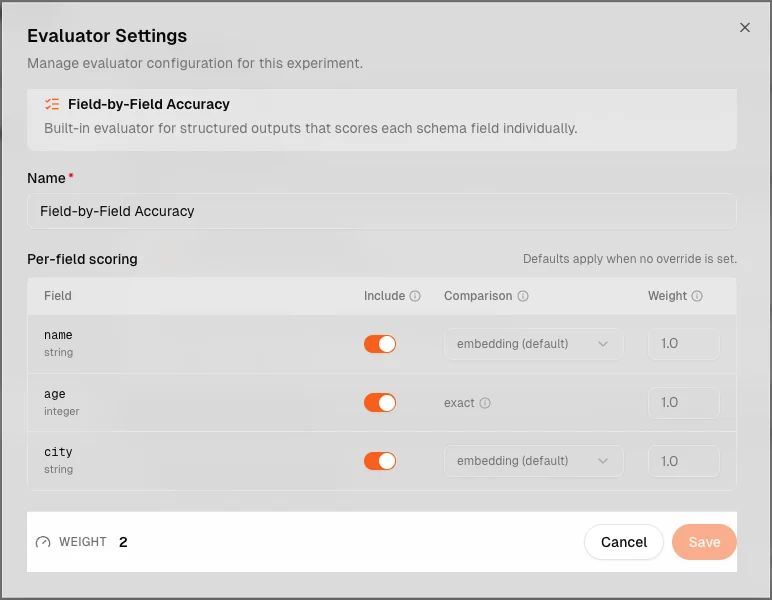
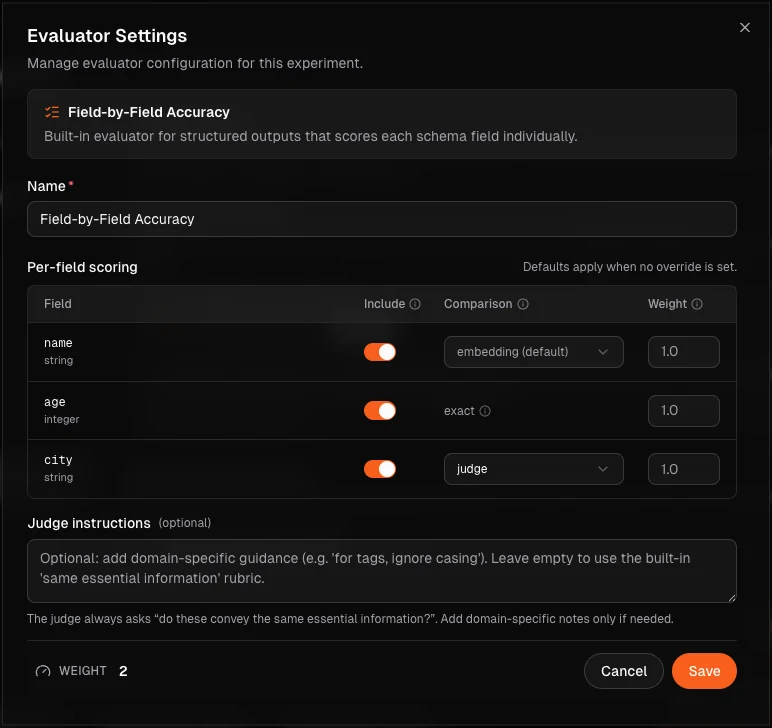
| Field-level judge | Structured outputs whose fields need different exact, semantic, list, or judge comparisons | Configure each output field independently, then weight the evaluator if it is combined with others. |
| Verifier agent | Holistic task completion, generated files, and workflows requiring investigation across several forms of evidence | Define one to eight named metrics, select allowed evidence, and optionally choose a model and investigation-step budget. Configure weight and threshold per metric; verifier evaluators have no overall weight. |
| Expected Behavior Judge | Case-specific workflow requirements where the execution path matters | Write Expected Behavior on each relevant case. The preset inspects case input, Expected Behavior, and execution trace and returns the fixed behavior_compliance metric. You may choose its model and metric binding. |
Classification F1
Classification F1 is deterministic and measures categorical predictions across the complete benchmark. It balances precision and recall, so it remains informative when one class occurs much more often than another. Use it for enum fields such as intent, document type, routing destination, or policy category. Every evaluated case needs an expected value for the selected fields.
Do not use F1 for arbitrary extracted strings, generated prose, continuous values, or a criterion that depends on why the Agent chose a label. Use field-level comparison for those outputs and add a trace-oriented evaluator only when the execution itself matters.
Field-level judge
A Field-level judge evaluates structured Output fields independently. This is the clearest choice when correctness can be expressed by the Agent contract but different fields need different rules: exact equality for identifiers, containment for required text, semantic comparison for equivalent language, array comparison for lists, or an LLM judge for a genuinely subjective field.
Prefer deterministic strategies wherever they express the requirement. Give field-specific judge instructions only to fields that require interpretation. This keeps failures attributable: you can see which part of the output regressed instead of receiving one unexplained holistic score.
Expected Behavior Judge
The Expected Behavior Judge is a focused preset for case-specific execution requirements. It reads
the case input, that case's Expected Behavior, and the submitted execution trace, then produces the
fixed behavior_compliance metric. Use it to check requirements such as using a required tool,
inspecting a complete document, validating before writing, retrying only after a transient failure,
or avoiding a prohibited action.
It is not a general output-quality judge. Do not use it when only the final answer matters, when the case has no meaningful Expected Behavior, or when several different execution paths are equally valid. In those situations, evaluate the outcome instead.
Verifier agent
The Verifier agent is the most flexible evaluator. Unlike a single judge call, it can investigate over multiple turns. It receives a read-only workspace containing the evidence you selected and can use platform-provided shell and image-inspection tools to open files, search evidence, inspect artifacts, follow relevant trace details, and revise its assessment before returning scores.
Use it when a criterion requires combining several sources of evidence or cannot be reduced to one field comparison—for example, checking a generated report against multiple source documents, validating that an artifact is complete and internally consistent, or judging overall task success from the output and execution trace together. Define one to eight distinct metrics so correctness, completeness, grounding, or usability remain separately explainable.
The Verifier agent is also the most expensive and slowest option. Select only the evidence needed for its metrics, write observable criteria, and keep the investigation budget proportionate to the work. Do not use it for equality checks, simple labels, or other rules a deterministic evaluator can measure more reliably.
Combining evaluators
Combine evaluators when they measure different failure modes. For example, use Classification F1 for the predicted label and an Expected Behavior Judge only if the Agent must also follow a required tool workflow. For a document-generation Agent, use deterministic field checks for structured metadata and a Verifier agent for the generated report.
Avoid measuring the same property twice under different names. Before trusting leaderboard order, run known-good and deliberately weak variants and confirm that each evaluator rewards and rejects them for the intended reasons.
Verifier metrics should each describe one observable success criterion and use stable snake_case keys. Their weights affect aggregation; an optional threshold turns that metric into a passing requirement. The default verifier budget is 20 investigation steps. Submitted output includes its generated files, while execution traces are enabled separately as evidence when tool choices, ordering, retries, or side effects matter.
See Agent Optimization for the complete benchmark workflow.
Custom LLM judges
Use a custom judge when quality depends on a domain rubric that deterministic code cannot express. A good rubric:
- defines one decision at a time;
- states the allowed score or rating values;
- explains how to treat missing evidence;
- uses examples for ambiguous boundaries;
- avoids asking the judge to infer facts absent from the trace.
LLM judges incur model usage unless they use a BYOK/custom provider. They also introduce model variance, so validate them against human-reviewed examples before using them as a release gate.
Reading results
Always check four things together:
- aggregate score or pass rate;
- per-case failures and rationales;
- skipped and failed evaluator executions;
- cost and latency introduced by the evaluation itself.